


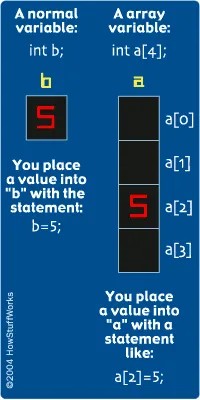
You need to store a thousand integers. Do you really want to declare int a, b, c... all the way to z and then keep going? No. That is tedious and prone to errors. Instead, you use an array.
An array is a collection of values of the same type. It packs them into a single block of memory. In C, you declare it like this:
int a[5];
That’s it. Five integers. Ready to go.
Why C Arrays Start at Zero
Here is the trick that trips up beginners. C arrays are zero-indexed.
If you declare int a[5], you have five slots. But they are numbered 0, 1, 2, 3, and 4. There is no a[5]. If you try to access a[5], you are reading memory that doesn’t belong to your array. C won’t stop you. It will just give you garbage or crash. This is a feature, not a bug. It’s fast. It’s also dangerous.
You access elements using square brackets. a[0] is the first item. a[4] is the last.
Generating Random Numbers in C
Let’s build something useful. We will create a program that generates 10 random numbers and sorts them.
First, you need the numbers. C’s standard library has rand(), but let’s look at a classic implementation to understand the mechanics. This code uses a linear congruential generator, a method from the K&R C book.
Notice the #define MAX 10 line. This creates a constant. Constants are written in all caps by convention. It makes them stand out. You declare the array int a[MAX] outside the main function. This makes it a global variable. It exists everywhere in the program.
The rand_seed variable is also global. It starts at 10. Because the seed is fixed, the “random” numbers are actually the same every time you run the program. If you want true randomness, you’d seed it with the system time. For now, consistency is good for debugging.
Understanding Bubble Sort
Now comes the hard part. Sorting.
We will use bubble sort. It is the simplest sorting algorithm. It is also the slowest. But it teaches you how loops and arrays interact.
Add this code to your main function, replacing the comment about “more stuff”:
What is happening here?
The outer loop runs MAX-1 times. The inner loop runs fewer times each pass. Why? Because the largest numbers “bubble” to the end of the array with each pass. You don’t need to check them again.
Inside the inner loop, we compare a[y] with a[y+1]. If the left one is bigger, we swap them. We use a temporary variable t to hold the value while we move the pieces around.
“The only easy way to truly understand what this code is doing is to execute it by hand.”
Take a piece of paper. Draw five boxes. Put numbers in them. Run the code line by line. Move the numbers. You will see the large numbers sink to the bottom. The small ones float up. It’s visual. It’s mechanical.
Common C Array Mistakes
C does not hold your hand. You will fall off the edge.
- No range checking. If you access
a[10]in an array of size 10, C won’t yell. It will read whatever memory is next. This leads to subtle bugs that are hard to find. - Function calls need parentheses. You must write
x = rand();. If you writex = rand;, you are assigning the memory address of the function tox. Not the result. It compiles. It breaks.
Try This
Don’t just read. Code.
- Change the loop that fills the array to a single line. Can you do it?
- Move the bubble sort logic into its own function. Call it
void bubble_sort(). Move the variablesx,y, andtinside that function. They become local. The arrayais global, so you don’t need to pass it. - Change
rand_seedto different values. Watch the output change.
Arrays are fundamental. They are the building blocks of data structures. Master them, and the rest of C becomes clearer. Ignore the zero index, and you will spend hours debugging a crash that happened three steps ago.


