



Meditation apps are everywhere. Most of them feel like they were designed by committee. Petit BamBou is different. It has carved out a space as a reference point for mindfulness, whether you are a total beginner or someone who has been breathing through anxiety for decades. The goal is straightforward: manage stress, sharpen focus, and stabilize your mental state using methods backed by actual psychology and neuroscience.
The app works because it is structured. It is not just a random collection of calming sounds. It is pedagogical. It guides you. And crucially, it is available everywhere you might want to be.
Where to Get Petit BamBou Meditation
You can find this tool on almost any screen. Android smartphones? It is there. iPhones and iPads? Yes. Apple Watch? Specifically optimized for wrist-wearing meditation. Even if you are stuck at a desk with a Windows, macOS, or Linux machine, the web version covers you.
The primary way to access Petit BamBou Meditation is through the official app stores.
- Android: Available on the Google Play Store.
- iOS: Available on the App Store for iPhone, iPad, and Apple Watch.
For those who prefer not to clutter their phone storage, the web-based service offers the core functionality. You simply log in via your browser. This flexibility is the app’s strongest suit. You can start a session on your commute via mobile and pick up exactly where you left off on your laptop at home. The synchronization is automatic. No manual exporting. No headaches.
Installation and Setup
The process is about as frictionless as digital onboarding gets. You do not need an IT degree.
- Go to the App Store or Google Play Store.
- Search for Petit BamBou.
- Click “Install.”
- Open the app.
- Create an account or log in.
That is it. The app then asks for your permissions and preferences. It is intuitive. If you can navigate a smartphone menu, you can install this.
Note that there is no dedicated desktop software for Windows or macOS. You cannot download a native .exe or .dmg file. You use the browser version. This is not a bug; it is a design choice that keeps the app lightweight and always up-to-date without requiring user-side patching.
Why This Specific App?
Why do people stick with Petit BamBou? It is not just about the voice in your ear. It is about the content strategy.
The library is vast. It covers:
* Stress management.
* Sleep improvement.
* Parenting support.
* Student focus.
* Children’s meditation.
There are also specific tracks for professional contexts and life transitions. The content is refreshed regularly. The instructors are qualified. The science is cited. This matters because mindfulness can feel like woo-woo mysticism if you do not ground it in something tangible. Petit BamBou grounds it.
The tracking features are discreet. You can see your progress without feeling judged. The app encourages regularity but leaves the pace to you. You are not forced into a rigid 30-day challenge if you do not want it. You can go at your own speed.
The Apple Watch Factor
The Apple Watch version is a standout feature. It allows for short, discreet meditation sessions directly from your wrist. This is useful for workplace breaks or moments when you need to reset but cannot pull out a phone. The interface is simplified for small screens. The audio is clear. It works.
Compatibility and Updates
The developers keep the app updated for the current and recent versions of Android and iOS. If you are using an ancient device, you might face issues. But for anyone with a phone from the last five years, it should run smoothly.
The web version requires a stable internet connection. Without it, you are offline. The mobile apps offer some offline capability, but you need to download the sessions beforehand. This is standard for meditation apps. You cannot stream silence.
The Bottom Line
Petit BamBou is not perfect. No app is. But it is one of the most accessible entry points into mindfulness. It does not require you to buy expensive equipment. It does not require you to move to a monastery. It just requires you to open the app and breathe.
Whether you use the phone, the tablet, or the browser, the experience is consistent. The content is high quality. The science is sound. It is a practical tool for a chaotic world.
You start where you are. You use what you have. The rest is just practice.
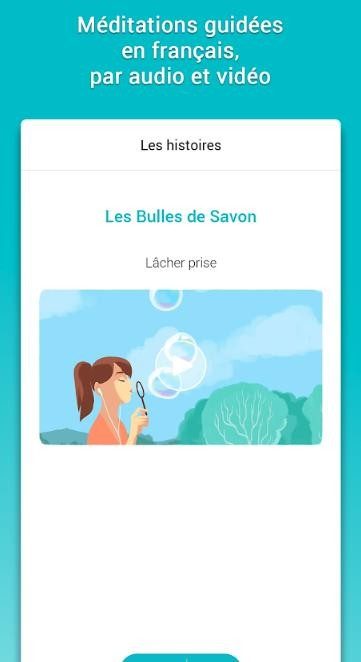

Break down costs and access models
You don’t have to spend a dime to download Petit BamBou. That’s usually where the trial begins. The application offers a variety of introductory courses. These aren’t just random clips. These are designed to help you immerse yourself in guided meditation without any prior financial commitment. You get to hear the instructors’ voices. Understand the structure of the program. You can test the tracking function. All this allows you to judge the quality before opening your wallet.
Those willing to dig deeper can unlock the entire catalog with the premium tier. This includes locked topic sessions and personalized paths in the free version. An easy-to-understand pricing structure is important when you’re building habits instead of just buying a product. Discounts appear regularly. Students often get special offers. There are also wellness features that can lower the price when you need it most.
There is also a gift function. You can also buy subscriptions for others. If your friends and family are interested but hesitant, this is a practical way to introduce them to mindfulness.
The company is transparent about how its subscriptions work. The update terms are clear whether you use a mobile device or the web interface. Cancellation conditions will be announced in advance. You can switch back to a free plan at any time. Your history is still intact. You won’t lose access to basic functions. It is a relief that there is no lock-in. Many apps will penalize you for leaving. With Petit BamBou, you can come and go without penalty.
Data protection is managed using strict protocols. Your personal information and personal tracking information are kept confidential. This platform does not treat your mental health journey as a commodity for sale.
Track your progress and keep your application up to date
Our services are constantly evolving. Updates provide new content and features designed to improve your user experience. Technical optimizations make the application run smoothly. Mobile device updates require action. Check Google Play or App Store for new versions. Download these for instant access to added content. In online services, changes are made automatically. Sign in to see new content.
If you face any problems, you can force update from settings. A simple reinstall will also work. Keeping applications up-to-date is important for security and integrity. Older versions had poor security and lacked a complete set of tools.
Personalization is at the heart of the experience. This app provides tools to track your health and progress. You can monitor how your training develops over time. Statistics, badges and personalized reminders help you maintain regularity. This approach is more encouraging than demanding. Don’t fall into the trap of performance anxiety. You are not graded on your meditation.
The media library is expanding to cover new topics. The new series deals with screen time management. Some focus on developing empathy. We also offer job interview and exam preparation courses. The platform also offers content suitable for business environments and educational institutions. This extends the app’s usefulness beyond casual relaxation.
The team behind Petit BamBou also focuses on education and accessibility. They host webinars and online seminars. They are developing certifications for those who want to teach meditation classes in professional or associational organizations. This offers practitioners the opportunity to deepen their skills.
If you need an older version of the application, please contact technical support. In some cases, they may accommodate the request. However, the preference is always for the latest version. Safer and more complete.
Integration with connected devices is progressing. This solution is more and more compatible with smart watches. This allows you to provide a connected meditation experience suitable for today’s fast-paced lifestyle. Sessions can be tracked directly from your wrist. Technology is catching up with the needs of convenience.
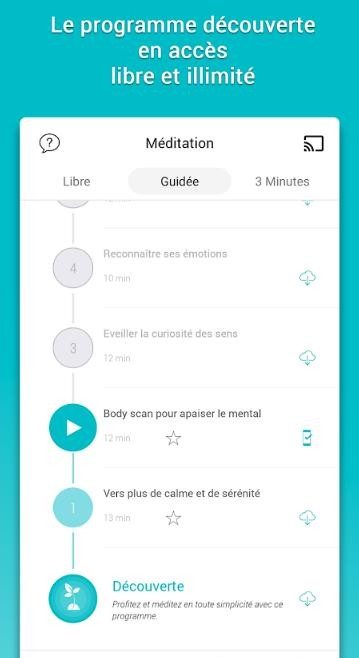

Petit BamBou: Meditation Specifications and Compatibility
Block the noise. You want to know if Petit BamBou: Meditation really works on your device without harming your battery or patience. The technical reality is simpler than you think. This is more than just an app. It is a synchronization service. This difference is more important than you think.
FeelVeryBien is the developer of this popular French wellness platform that builds an ecosystem that reflects your habits. Your history and settings stay the same whether you’re using Android, iOS, or signed in to a desktop browser. You won’t lose your streak even if you switch from a phone to a laptop.
This is the breakdown. No fluff.
Main technical requirements
This service works in a freemium model. You can download it for free. You don’t have to pay to complete the basic course. However, if you want the entire library (advanced personalization, offline mode, and all programs), you need a subscription.
How does Petit BamBou handle data synchronization between devices?
Account required. Period. If you don’t log in, you’re just a guest. When you access your account, the app transfers your meditation history and settings to the cloud. This enables a seamless transition between mobile and web.
Supported operating systems
- Android: Available from Google Play.
- iOS: Supports iPhone, iPad and Apple Watch.
- Web: Available with any modern browser on your desktop computer.
Please note that the user interface and main content are mainly in French. Other languages may appear depending on your region and content offering, but the backbone of the experience is French. If you’re looking for a meditation app for native English speakers, this might not be for you unless you’re comfortable with the language barrier.
Connectivity and Offline Usage
您需要互联网连接来完成三件事:
1. 注册。
2. 同步您的进度。
3. Accessing new content drops.
然而,离线模式 才是技术设计为通勤者带来亮点的地方。 如果您的订阅计划包含它,您可以下载sessions. 这使您可以在没有数据信号的情况下meditate on a plane or in a subway tunnel. The app caches the audio locally.
Which subscription includes offline access?
它不是自动的。 The freemium tier usually limits you to streaming. Offline downloading is typically gated behind the paid monthly or annual subscription. Check the specific offer details before you commit.
Privacy and system integration
The applications utilize the original functions of the operating system. Notifications, reminders, and accessibility settings (such as VoiceOver and TalkBack) are handled directly by iOS and Android. This keeps the app lightweight. It’s not reinventing the wheel. Use the scroll wheel already on your phone.
FeelVeryBien maintains a dedicated privacy policy. You can manage tracking information and notification rights in the app. This is not a black box. You have some control.
Why This Technical Structure Matters
Most meditation apps are silos. You use them on your phone. You forget about them on your computer. Petit BamBou breaks that wall. The web version isn’t an afterthought; it’s a parallel interface.
This matters because stress doesn’t stick to one device. You might start a breathing exercise on your phone at work. You might want to review your history on your laptop at night. The sync ensures continuity.
Is the app heavy on resources?
Generally, no. ネイティブ OS の統合とストリーミング (またはキャッシュされたダウンロード) に依存することで、ストレージの肥大化を回避します。 The installer size is kept minimal. 焦点はコンテンツにあり、複雑なローカル処理ではありません。
Conclusion
If you need a meditation practice that fits into your multi-device life, Petit BamBou: Meditation provides the technology infrastructure to support it. Freemium offers a low risk of entry. The paid level allows offline use and the program’s full range of utilities.
What’s in it? language. Subscriptions are also available. But technically it works. Synchronize. I adapt.
The real question isn’t whether it fits your phone. What matters is whether you can stay in sync long enough for it to become a habit.

Hardware Bottlenecks: Why your GPU is holding you back
The software is sharp. The models are smarter. But what about the hardware? It’s gasping for air.
You’ve seen the demos. Large Language Models generate code, debug scripts, and write emails in seconds. It feels effortless. It’s not.
Behind the scenes, data is packed into bottlenecks so that highway traffic looks like a ghost town. The culprit is not the algorithm. It’s the silicon.
Specifically, it’s the GPU.
VRAM: New RAM
In the old days, you worried about system RAM. Enough slots? Good enough. Now, the game has changed. It’s all about VRAM. Video random access memory.
Think of VRAM as the loading dock for your GPU. If the platform is too small, the truck can’t unload. The model cannot be loaded. Everything stalls.
This is why you can’t just run a 70 billion parameter model with a laptop’s integrated graphics. The numbers don’t fit.
The size of the model determines the amount of VRAM you need. The size of the VRAM determines the price.
Here’s the rough math:
– A 7B parameter model? It takes about 4-8GB of VRAM to load, but more if you want it to run faster.
– A 70B parameter model? You’re looking at 40-80 GB. Minimum.
– 100B+ model? Requires enterprise grade hardware. Or you need to quantize.
Quantization is the magic trick. It shrinks the model. The precision drops from 16-bit floating-point numbers to 8-bit integers to 4-bits. You lose a bit of accuracy. You gain massive speed. And massive access.
It’s a trade-off. Precision for accessibility.
The Cloud Escape Hatch
Not everyone has a $3000 graphics card on their desk. Most people don’t.
So they go to the cloud.
AWS. Azure. google cloud. Together, they form the backbone of modern AI inference. You rent the power. You pay for the seconds it runs.
It’s expensive. However, it is scalable.
As demand grows, the cloud scales. The cloud shrinks as it descends. No need to buy hardware. Rent is a headache.
This creates new markets. Inference API. You are sending a tip. The outcome has been decided. You never see the GPU. No need to worry about VRAM.
This is the easiest way to get started. But it’s not the cheapest way to stay overnight.
Open Source and Walled Gardens
Then there is the open source movement. The faces hug each other. Camel. Mistral.
These templates are free. You can download it. Can be driven locally. If you have the hardware.
advantage? privacy. The data will not be removed from your computer. No company will follow your prompts.
What are the disadvantages? Complicated. Setting up a local inference server is not plug and play. Settings are required. Maintenance is required. This requires patience.
Walled gardens – OpenAI, Anthropic, Google – are easier. Ready to use. However, there is a fee per token. And they see everything.
You have to choose. Comfort or control?


