




No new cables are needed. No need to drill holes. All you need is a wall outlet.
That’s what power-line networking are all about. This is a way to connect computers and devices in different rooms through wiring that is already installed throughout the house. No new wires. No new expenses will arise. It’s a network that works because you can connect anywhere.
It’s similar in spirit to HomePNA, which also promises a “no new wires” solution. But actually there is a difference. Not all rooms have telephone sockets. Every room has a socket, usually located near the computer or TV. Power line networks make use of this everywhere. Plug the adapter into the wall near the computer, connect it to the router and establish a network connection. Another adapter for bedrooms, offices and basements. They talk to each other through the mains electricity.
The Cost Argument
Here is the math. 电力线网络不需要新的布线。 It adds zero cost to your electric bill. 数据信号是微小的低功率传输,利用 120 伏(或 230 伏,取决于您居住的地方)电流。 仪表并没有转得更快。 您在公用事业账单上看不到“网络流量”行项目。
正因为如此,它可以说是连接不同房间中的计算机的最便宜的方法。 你买适配器。 你把它们插上。完成。 没有承包商。 没有电工。 底板上没有同轴电缆。
How It Actually Works
The technology behind this is not magic. This is signal processing. The computer sends the data to the powerline adapter via an Ethernet cable. The adapter modulates the data onto a high-frequency carrier. Typically in the 2-30 MHz range, well above 50 Hz or 60 Hz mains power. The signal is injected into the wire. It goes through the circuits in the house, jumps the circuit breaker and goes through the junction box to another adapter. The second adapter demodulates the signal, picks up the data and sends it to your device via Ethernet or Wi-Fi.
It’s very simple. It’s elegant. It’s also flawed.
The Flaws in the System
Despite their convenience, power-line networking are notoriously inconsistent. There is noise in the power grid. Home appliances turn on and off. Refrigerators hum. Microwave ovens zap. All of these can cause interference to power lines. High-frequency data signals can be lost in noise.
Performance varies. The connection in the living room can be fast, but the connection in the kitchen is slow. Or vice versa. The quality of the wiring in your home is important. Problems can occur in older homes with old circuits, ground loops, or split-phase wiring problems. Even newer homes with GFCI outlets and surge protectors can filter the data signal and disrupt the connection.
Next is security. Power line signals can leak outside your home or into a nearby power grid, and someone with the right equipment could theoretically be able to intercept your traffic. Encryption helps, but it also comes with risks that are not present in wired or Wi-Fi networks.
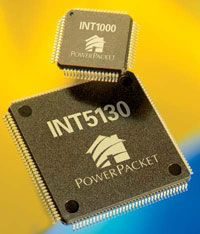
The landscape of the home network was once defined by the binary choice. On one side, you can take advantage of Intelogis’ Passport technology, the original player in the space. The other is PowerPacket, a newer protocol developed by Intellon. The HomePlug Alliance ultimately bet on PowerPacket as the standard for power-line networking, which shifted the industry’s trajectory.
Before you get into a technical clash, it helps to first understand why someone would wire their home through the wall sockets. The appeal is obvious. You are already paying for the infrastructure. the electrical wiring is there. Each room has electrical outlets. Installation is easy. Move your printer and media devices anywhere without running cables through drywall.
“Uses existing electrical wiring. A typical home has multiple outlets in each room.”
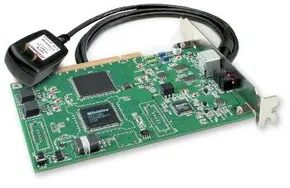
The initial cost barrier is also low. At the time of this comparison, a complete Intellogis Passport kit that connects two computers costs about $50. Eventually, PCI-based options appeared, but you didn’t even have to open the computer case to install the card.
Passport Limitations
However, the original Passport technology had significant bottlenecks. It was painfully slow, capping out between 50 Kbps and 350 Kbps. It’s fast enough for basic file sharing, but not useful for anything media-intensive. Performance is also fragile. Heavy power usage in the house can interfere with the signal. Older wiring often exacerbated these issues.
Security was another headache. Passport requires all data to be encrypted to maintain a secure network, but this requirement adds complexity. The hardware is also clunky, with large wall adapters dominated outlets. For many years, it was strictly limited to Windows-based computers. It also ignores other global voltages and relies on the standard 110V line. If you want to share your printer, its advanced features crippled by the connection.
PowerPacket Advantage
Intellon’s PowerPacket technology is designed to address every weakness of the Passport. The headline feature is speed. PowerPacket’s speed is 14 megabits per second (Mbps), which opened the door for applications that Passport couldn’t touch, such as streaming audio and video throughout your home.
But speed is only part of the story. PowerPacket claims to “avoid” disruptions caused by power line noise and maintain stable connections and speeds even with the house was drawing heavy current. It didn’t limit printer features. It was agnostic about operating systems and works on all operating systems with appropriate drivers.
The design of the hardware has also been improved. Instead of large adapters, PowerPacket devices embed the necessary circuitry directly and only require a standard power cord. It works regardless of supply voltage and current frequency, which makes it viable internationally. It included encryption natively. In testing, Intellon reported no signal degradation even on older, noisy wiring.
How They Actually Work
So how do these two competing powerline technologies actually transmit data?
Power line communication is based on connecting high-frequency signals to the existing low-frequency network. The key difference is “how” the signal is managed.
Passport uses a simpler modulation system. It transmits data over power lines, but suffers from the noise characteristic of electrical systems. Motors, dimmers and cheap power supplies can cause interference. As a result, channel noise reaches its limit at speeds as low as 350 Kbps. Large adapters are basically repeaters that try to boost weak signals between different circuits.
PowerPacket takes a different approach. A more complex digital signal processing technique is used. Deal with the noise proactively instead of just forcing your data into the noise. By analyzing the characteristics of power lines, PowerPacket can identify “silent” frequencies and use them to transmit data. That is why we insist on avoiding disruptions. It’s not about noise reduction. It sails around it.
This technical advantage enables a speed of 14 Mbps. This also means that the signal travels further and more reliably over old cables that can block Passport connections. encryption
If you’re looking for a review of Intellon PowerPacket technology, you’re probably trying to choose between the two main approaches to powerline networking. Marketing is not the only difference. This is basic physics. A robust and adaptive approach is used that mimics DSL. The other relies on simpler, older technology to combat noise.
Intellon’s OFDM Approach
Intellon’s PowerPacket technology is the engine behind the HomePlug Powerline Alliance standard. It’s not just about transferring information along wires. It orchestrates them. The core mechanism is an extended form of OFDM (Orthogonal Frequency Division Multiplexing).
Think of OFDM as an advanced upgrade to frequency division multiplexing (FDM) used in early telephone line modems. FDM divides the available bandwidth into uniform chunks and separates the computer data from the audio signals. OFDM goes one step further.
In a typical HomePlug installation, the frequency range of the electronic subsystem (4.3 MHz to 20.9 MHz) is divided into 84 different carriers. Data packets are sent simultaneously across multiple carriers. It’s not just about speed. It’s for resilience. The system is rate-adaptive. When heavy appliance starts up and makes noise at a certain frequency, the PowerPacket chip detects the disturbance immediately. It doesn’t drop the connection. It simply shifts the data load to a clean carrier that is still available.
This design maintains Ethernet-class connection even when the power lines are messy. No data loss. No retransmissions.
The current generation of this hardware has a maximum speed of 14 Mbps. This outperforms most early wireless solutions. But the real story is scalability. The OFDM method is highly scalable, so future iterations are expected to reach speeds of over 100 Mbps. that headroom matters as audio streaming and VoIP become common household utilities.
The main advantage of OFDM is its ability to adapt in real time and consider noise as a controllable variable and not as a factor interfering with the connection.
Limitations of Intelogis FSK
Intelogis takes a different, older path. Their technology is based on frequency-shift keying (FSK). It’s a binary method: One frequency is 1 and the other frequency is 0. It’s very simple. It is also fragile.
FSK operates in a narrow band just above typical line noise thresholds. That narrow window is a liability. If anything interrupts those specific frequencies, the data flow stops. The transmitting computer has to resend the packet. This overhead can significantly degrade performance.
I saw this firsthand. High-powered appliances such as washing machines and dryers can slow down the network significantly. The noise from the motors drowned out the data signal.
Intelogis tried to alleviate this problem by adding power stabilizing extension cords. Computer devices must be connected to these sockets and the strips between the device. The goal is to eliminate electrical noise before it reaches the modem. Although this is useful, it does not correct the fundamental weakness of the FSK approach.
There is also a geographical limitation. Current electrical networks are optimized for 110 volt systems. Outside of North America, where the standard is 220-240 volts, this technology has little value without significant changes.
Costs and installation
Hardware costs for both solutions are comparable, typically $50-$100 per pair. Installation is trivial for both. Plug the adapter into an outlet near the router and connect via Ethernet. Plug the other adapter into an outlet near the device and connect.
However, the user experience is different. With Intellon’s OFDM system, you hardly notice any slowdown when your refrigerator is switched on. Intellogis’ FSK system may experience latency spikes during peak usage.
For North American users in noisy electrical environments, the adaptability of Intellon technology often justifies the choice. The Intellogis is a practical, if less powerful, option for users on a budget but with a reliable power supply.

The Cost of Doing Business
If you want to complete the wiring in a small office or home without drilling holes in drywall, Intelogis offers a starter kit for $59. This package contains enough hardware to connect two computers and one printer. If you need an extension, each additional adapter costs about $40. Be careful. There are specific versions of data transfer computers and printers. If you buy the wrong one, all you get is silence.
The financial benefits are clear. The electricity network is based on the existing electricity network, so your monthly electricity bills will not increase. There are no hidden consumption charges. In terms of initial costs, PowerPacket technology directly competes with HomePNA solutions. This is much cheaper than setting up a wireless 802.11 network, which usually requires an expensive access point and a compatible card for each device.
Plugging In the Hardware
The physical installation depends on the parallel port on your computer. This is the old wide connector used for all printers and scanners. The wall devices can be connected directly to a standard socket. Do not connect to a surge protector. Most shielding noise filters block high-frequency data signals, rendering the network unusable.
A parallel cable connects this wall unit to your computer’s parallel port. Here is the catch: The Powerline network adapter must be the “last” item connected to the port. If you have a scanner or Zip drive attached, you need a pass-through port to pass the signal. Most older peripherals do not have this feature. If your device only has a parallel port, the printer requires a separate wall device.
There is a functional trade-off here. Current electrical networks do not support bidirectional printing. Two-way communication allows the printer to send status updates, such as “low ink” or “paper jam warnings” to your computer. The printer continues printing. If you are not happy with the toner out, you will not receive a notification. You won’t know until you try to print it and see a blank page.
Software and installation
Hardware is getting smarter. The original PowerPacket device required a USB or Ethernet cable to connect the computer to the wall adapter. In future iterations, the circuit will be built directly into the plug. All you need is a power cord.
Once the cables are connected, installing the software is easy. The program automatically finds all nodes in the network. Whether you use cable, DSL, or dial-up, the included proxy software lets you share your Internet connection with all the other computers on the network. Adding a computer is as easy as plugging in a new adapter and running the installer. You can add printers with printer-specific plug-in adapters. Sharing files and printers is done through the standard Windows user interface, so you don’t have to relearn muscle memory.
Peer-to-peer vs. client/server
Home networks are typically divided into two groups. Client/Server Networks depend on a central administrator. One machine holds the keys to the kingdom and distributes information to all other devices. Peer-to-peer Networks are more democratic. Each device communicates directly with other devices without checking from central authorities.
Intelogis Passport technology uses a client/server model. The first computer on which the software is installed becomes the application server. It acts as a conductor, controls the flow of information and tells each device where the other devices are. However, Intellon’s PowerPacket technology uses a peer-to-peer model. It is decentralized. This difference is important for network scaling and traffic management, but for small homes this difference is primarily academic.
The future of Power-Line Networking
Intellon’s PowerPacket technology is designed to work well with other technologies. Compatible with wireless and HomePNA solutions. This makes power lines the ideal backbone for multi-technology home networks. You don’t have to give up your existing settings to adopt the new standard. You can also stack them.
The common denominator is power. Even “wireless” solutions require a base station that plugs into the wall. This power cord connects your wireless network to your entire home’s power line infrastructure. They are all connected to the same network.
There are two other significant players in the home network area: telephone lines and wireless. Both have their pros and cons.
-
How telephone line networks work
-
How wireless networks work
You can find more information about power-line networking in the links on the following pages.
Frequently Answered Questions
What is power line in networking?
它是一种利用建筑物内现有电线传输信号的数据传输方法。 它在家庭和小型办公室中很受欢迎,因为它无需穿过墙壁铺设新电缆。
Lots More Information
Related HowStuffWorks Articles
-
How the home network works
-
How telephone line networks work
-
How wireless networks work
-
Home network quiz
-
How FiOS works
-
How Ethernet works
-
How Bluetooth works
-
How firewalls work
-
How routers work
-
How the LAN switch works
More Great Links
-
Powerline Networking
-
Intellon
-
PowerlineCommunications.net: Powerline Communications Network
-
NTS Testing Laboratories: Power Line Network
-
Press Release: Intellon Announces FCC, UL and Homeplug Certifications – August 2002
-
PCWorld.com: Power Line Network Standard Debuts – June 2001
-
EE Times: Power-line network chips, systems make inroads – January 2001