


WWDC 2026 started. And it started with AI. Lots of it.
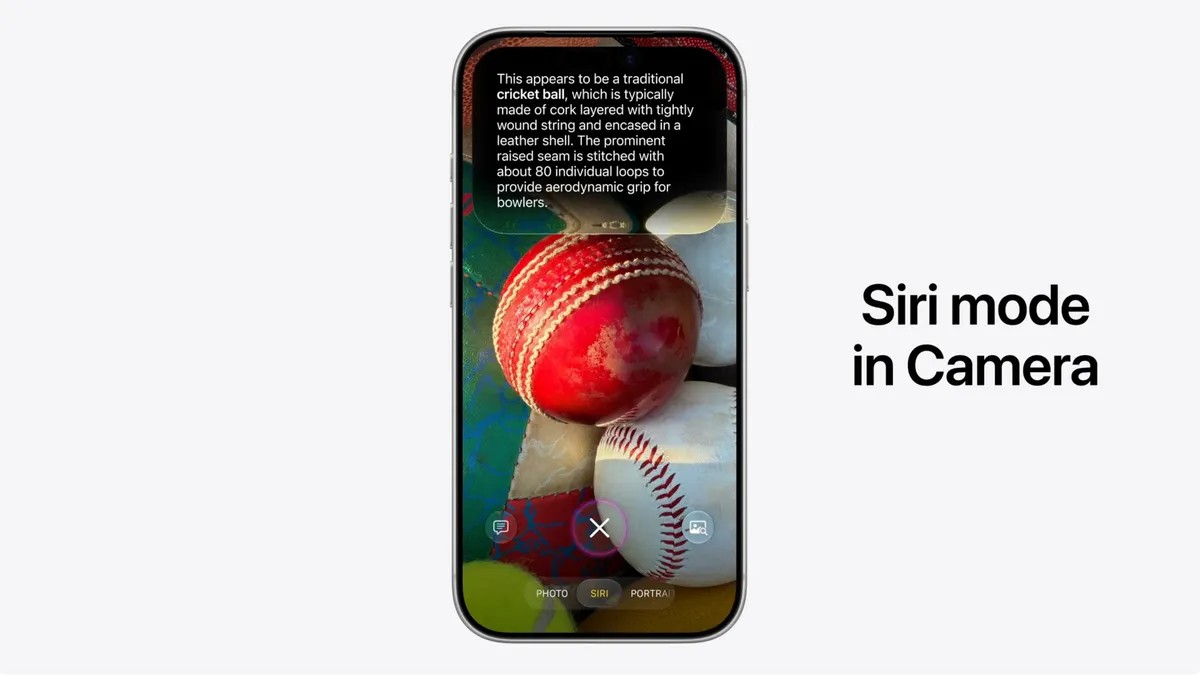
Apple’s keynote wasn’t about hardware. It was about software that sees. Specifically, Apple dropped Siri Mode for iPhone camera, a feature that turns your rear-facing lens into an active conversation partner. No more just taking pictures. Now, you ask about what you are seeing.
The launch happened Monday morning. Alongside visual intelligence features rolling out across Apple’s ecosystem, the iPhone gets a new button inside the native Camera app. You tap it. Siri wakes up. But this isn’t the voice assistant of 2025. It looks at your frame. It processes it. Then it answers.
How to use AI visual intelligence in the iPhone camera
The premise is simple. Apple wants you to “get information and take action” on the world around you. The execution is tactile. You point your phone at an object. You hit a new shutter button designated for Siri. The AI scans the scene. It replies.
A prerecorded demo at the event made it look effortless. The tester pointed the camera at a ball on the ground. Siri didn’t just guess. It identified a “traditional cricket ball.” Then it explained the construction—cork core, wound string, leather shell. It went deeper than a surface label.
This isn’t a toy. The intent is utility.
You can swipe down for rich details. You can ask follow-ups. It turns a snapshot into a research tool. Why carry a field guide or a dictionary when your pocket does both?
Why use AI for receipts and bill splitting?
Context matters. A photo of a sphere is trivia. A photo of a paper slip from a restaurant is work.
Another WWDC demo showed a receipt scanned through Siri Mode iPhone camera. The AI didn’t just digitize the text. It broke down the line items. It calculated the cost per dish. Then it got useful.
The system let the user select specific menu items. From there, it could split the bill using Apple Cash. This is the “take action” part of Apple’s pitch. You aren’t just looking. You’re managing money.
Is it faster than typing it in manually? Yes. Is it less error-prone than mental math? Also yes.
“The Siri mode also suggests relevant actions based on what’s in front of your lens.”
This quote from Apple sums it up. It anticipates need. See a plate of food? It offers nutritional insights. See a foreign menu? It translates and summarizes. See a plant? It identifies and suggests care instructions. The specific actions aren’t hard-coded. They’re generated in real time based on visual context.
Where is Siri Mode data stored on your phone?
Privacy always looms when cameras listen. Apple addressed the storage question directly. Your images don’t just vanish after the interaction. They stay.
Conversations and captured frames from Siri Mode are saved directly in the Siri app. It becomes a log of your visual queries. This matters for users who want to reference that cricket ball fact later, or double-check the nutritional stats from lunch last Tuesday.
The data lives in your ecosystem