



Most people think encryption is the endgame for privacy. You scramble the data, send it off, and hope the other person has the key. But encryption has a flaw. It screams for attention. A block of gibberish tells anyone looking that something is worth cracking. That’s where steganography comes in. It doesn’t just hide the meaning of the message; it hides the existence of the message entirely.
Enter Steghide. It’s a command-line tool that lets you bury files inside images or audio tracks. The carrier file looks normal. Sounds normal. But inside, you’ve got a secret document, an executable, or a text file resting in the least significant bits of the data. It’s invisible to the naked eye and tricky for automated scanners to flag.
What Steghide actually does and why it matters
Steghide isn’t magic. It’s math. Specifically, it uses algorithms like Rijndael, Twofish, or Blowfish to encrypt your secret payload before stuffing it into a container. The container can be a BMP, JPG, WAV, or AU file.
Why use this over a simple zip file with a password? Because a password-protected zip file is obviously a password-protected zip file. Steghide modifies the least significant bits of the carrier file. To a human, a JPEG with a secret inside looks identical to the original. To a casual observer, it’s just a picture of a cat. The risk of detection drops significantly because there’s no obvious anomaly to trigger suspicion.
This matters for a few groups:
– Security researchers testing system defenses.
– Journalists or activists moving sensitive data through censored channels.
– Anyone who needs to verify that a file hasn’t been tampered with during transfer.
It’s not just about camouflage. It’s about plausible deniability. If someone demands you open a file, you open a picture. You don’t even have to lie about not knowing what a picture is.
Which files can you hide and where does Steghide work
Steghide is picky about its carriers. It won’t touch a PNG or an MP3. Stick to:
– Images : BMP, JPG
– Audio : WAV, AU
The payload? Almost anything. Text, archives, executables. It doesn’t care.
As for the platform, Steghide plays nice with Windows and Linux. It’s open-source, which means you can audit the code if you’re paranoid enough to want to. That transparency is a huge plus for security pros who trust nothing they can’t verify.
Mac users, you’re out of luck for a direct binary download. There’s no native macOS package. You can compile it from source if you have the necessary dependencies installed, but that’s a headache most users won’t want to deal with. Android and iOS? Forget it. No support there.
How to install Steghide on Windows and Linux
Installing the tool is straightforward, but the method changes depending on your OS.
On Windows
You’ll find executables or archives online. Download it. Unzip it. The tricky part isn’t the install; it’s the path. You need to add the Steghide directory to your system’s PATH environment variable. Why? Because you’ll be using the command line. If you don’t set the PATH, you’ll have to navigate to the folder every single time you want to run a command. That’s annoying. Fix it once, save time later.
On Linux
It’s easier. Most distributions have it in their repositories. On Ubuntu or Debian-based systems, you can just run the package manager command. It installs in seconds. No PATH juggling required. It just works.
Using Steghide: the basics of hiding and retrieving
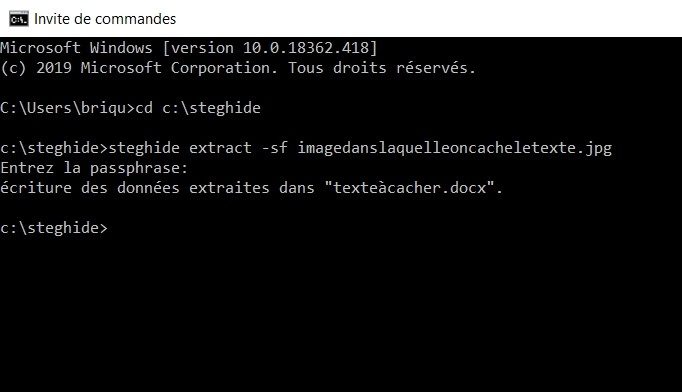
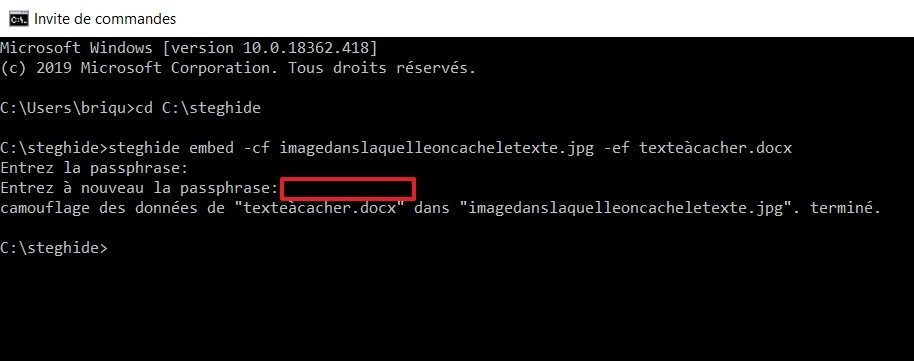
Steghide runs entirely from the command line. There’s no GUI. No drag-and-drop. Just text. This scares some people off, but the syntax is logical once you see it.
To hide a file, you need three things:
1. The carrier file (the image or audio).
2. The secret file (what you want to hide).
3. A passphrase.
The passphrase is critical. Steghide uses it to encrypt the payload. If you lose that password, the data is gone. There is no recovery. No “forgot password” link. Just gone.
The process modifies the carrier file. You’ll end up with a new file (or an overwritten one) that looks identical to the original but contains your secret.
To extract the data, you need the modified carrier file and the exact same passphrase. Type them in, and the tool spits out your hidden file.
Why file quality actually changes the game
Here’s the part everyone skips. Not all carrier files are created equal.
If you use a highly compressed JPEG, Steghide struggles. Compression algorithms discard data they think is unnecessary. Sometimes, that “unnecessary” data is where your secret bits are hiding. The result? Extraction fails. Or worse, the file gets corrupted.
Use uncompressed or low-compression files. A BMP is safer than a JPG. A WAV is safer than an MP3 (though Steghide doesn’t support MP3 anyway). The more raw data you have, the more room Steghide has to hide its payload without breaking the file structure.
It’s a trade-off. Bigger files are safer for steganography. Smaller files are easier to send. You pick your poison.
Steghide doesn’t care if you’re a pro or a newbie. It just follows the rules. Break them, and your secret disappears.
The tool is simple. The implications aren’t. You’re not just hiding data; you’re hiding the fact that data exists. That’s a powerful distinction.
What do you do when the system assumes there’s nothing to find?
Why Steghide still beats OpenStego and SilentEye
OpenStego is nice. It has a GUI. You can click things. That’s its main selling point for people who hate the command line. But it lacks flexibility. SilentEye works on Windows and handles more file formats. It’s simple.
Steghide is different. It doesn’t care about your comfort. It cares about the algorithm.
The real advantage of Steghide for command-line users is the control. You pick the encryption method. You adjust the security level based on how sensitive the data is. This isn’t something you see in the competitors. OpenStego locks you in. SilentEye simplifies too much.
Open source means no secrets in the code.
There are no hidden functions. No backdoors. The GPL license guarantees transparency. If you want to hide data without trusting a black box, this is why Steghide remains a robust choice.
Is Steghide actually free?
Yes. Entirely.
There is no “Pro” version. No student license. No paywall for advanced features. What you see is what you get. Whether you are a hobbyist or a security professional, the tool is identical.
The catch? Updates.
It’s community-driven. That means development isn’t a full-time job for someone. Updates can be sparse. You might wait months for a patch.
If you need the latest security fixes, check the official archives. Older versions exist in trusted repositories, but stick to the newest build if possible. Don’t run outdated steganography software if you care about secrecy.
How to learn and update Steghide properly
Don’t guess. Read the docs.
Universities use Steghide as a teaching tool. It’s the standard for introductory steganography modules. You’ll find tutorials everywhere. Video guides explain the install. Articles break down common errors. They tell you which cover files work best.
Updating depends on your OS.
- Linux : Use your package manager. Run the system update command. It’s usually handled automatically.
- Windows : You’re on your own. Check the official site. Look at specialized forums.
If a new version drops, uninstall the old one first. Then install the new. It prevents conflicts. It clears out old vulnerabilities.
Why bother with steganography tools?
Data hiding isn’t just a party trick. It’s a core part of information protection.
Steghide teaches you the basics of cybersecurity. The open code is a textbook. You see how encryption interacts with file structures. It’s practical.
You can use it to hide a single file. Or you can study the cryptographic mechanisms behind it. The barrier to entry is low. The depth is high.
It works on Windows. It works on Linux. The documentation is extensive.
If you need to add steganography to your security toolkit, this is the place to start. The download is free. The learning curve is real. But the control is yours.
Steghide specs and what they actually mean for your workflow
Look at the sheet. It’s not flashy. Steghide doesn’t come with a GUI. There’s no dashboard, no drag-and-drop wizard, no “click here to hide your secrets” button. Just a terminal prompt. This is a tool for people who understand that visibility is the enemy of security. If you’re used to modern software interfaces, this will feel abrupt. Good.
The GPL license means it’s free. Truly free. Open source. Community-driven. You don’t owe anyone anything. But you do owe yourself the effort to read the docs.
It runs on Windows and Linux. That’s it. No native Mac support out of the box, which is a common tripping point for users expecting cross-platform parity right out of the zip file. You’ll need Wine or a VM if you’re on macOS, or just stick to the supported OSes. Why complicate it? Security tools shouldn’t rely on compatibility layers unless necessary.
Which file formats does Steghide support?
Here’s the hard limit. JPEG, BMP, WAV, AU.
That’s it.
Not PNG. Not MP3. Not TIFF.
If you try to shove data into a PNG, Steghide won’t touch it. It’s not a universal steganographer. It’s specific. Why? Because lossless formats like PNG don’t hide changes well enough for this specific algorithm, or rather, the tool was built around the redundancy found in lossy compression (JPEG) and raw audio structures (WAV). This matters. If you have a PNG, convert it to JPEG first. Don’t skip this step. It’s the most common reason extraction fails later.
The carrier file is the host. The secret is the guest. The guest must fit.
Encryption options inside Steghide
You get a choice. Rijndael (AES), Twofish, Blowfish.
Most people just pick AES. It’s the standard. It’s fast. It’s trusted. But Twofish is there if you want a different block cipher. Blowfish is older, but still functional for this use case.
The key? Your password.
Steghide doesn’t manage keys for you. It derives them from the password you type. That means strong passwords are non-negotiable. If your password is “password123”, the encryption is a joke. The steganography hides the existence of the data, but the encryption protects the content. Both layers need to hold.
There’s also compression. Steghide compresses the payload before hiding it. This is smart. Smaller payloads mean fewer bits to alter in the carrier file. Fewer alterations mean the image or audio looks and sounds more normal. It’s a subtle advantage, but it adds up.
How Steghide hides data without breaking the file
It uses LSB (Least Significant Bit) embedding.
Sounds technical. It is. But the effect is simple. It tweaks the least important bits of the color or audio values. Your eye can’t see the difference. Your ear can’t hear it. The file size changes slightly, but not enough to trigger alarms in most casual checks.
This is why file integrity matters. If you edit the image after hiding the data, even with a simple photo editor, you might destroy the hidden payload. Steghide adds a checksum to verify the content upon extraction. If the bits got scrambled, it’ll tell you. It won’t silently give you corrupted junk. It’ll fail.
No internet connection is needed after installation. It’s local. Offline. Private.
Why this matters for everyday security
You don’t need a supercomputer. The specs list “no particular hardware requirements.” It’s lightweight. It runs on a potato.
But it demands precision.
- Pick the right format. JPEG for images. WAV for