



We live in a world where algorithms rule reality. Social media feeds are custom echo chambers designed to keep you scrolling by showing you what the platform thinks you want to see. It is very convenient. It is very addictive. And completely opaque.
Before that, there was an easier and more honest way to use the web: RSS.
If you’re under 30, you might think RSS is outdated. A relic from the era of telephone networks. You’re not entirely wrong. But you are missing the point. RSS is not dead. It just stopped trying to be cool. While we’re distracted by shiny new apps, it recedes into the background and energizes our infrastructure behind the scenes.
Ghost in the Machine: How RSS Really Works
RSS stands for Really Simple Syndication. At least, that’s what it stands for now. In the late 1990s, it meant RDF site summaries or rich site summaries. When the RSS 2.0 standard arrived in 2003, the name changed, but the core functionality remained the same.
It’s a protocol. A standardized way for websites to publish updates in a format that compatible software can read. Think of it as a universal content delivery language. Instead of visiting 50 different blogs, news sites, or podcasts to learn about new content, subscribe to a feed.
Your RSS reader aggregates that content into a single, chronological stream.
This completely changes the dynamic. You no longer have to rely on social media algorithms to decide whether to publish your favorite authors’ posts. You can view them all in publication order. There are no hidden filters. Engagement headlines never take precedence over content headlines.
You may see an orange icon in your browser. Firefox and Opera display a square icon in the address bar. Safari uses a blue rectangle. Internet Explorer has its own toolbar icons. These are not just decorations. They are signals. They mean this site has an RSS feed available.
Click on it. You can add it to your reader. Or ignore it. But understanding its role is key to managing your information diet.
The Tools of the Trade: RSS Readers Explained
RSS readers are engines. This is software that retrieves, organizes and displays content from your subscribed feeds.
In the early days, these were desktop applications. Currently, they are mainly web-based or mobile applications. The principles have not changed. You feed them URLs. They give you a clean, text-focused interface.
Why use it? Because it’s efficient. You can browse hundreds of titles in a few minutes. You can skip the noise. You can also go back and read only the parts that interest you.
Discovery is also possible. Many readers find it useful to find new resources by analyzing what they have already read. It’s a decentralized internet of content. No single company owns the feed. No single company controls your inbox.
This is very important for those who are tired of relying on platforms. If you get banned from Twitter, your followers will decrease. If Facebook changes its algorithm, you lose your reach. With RSS, you own your subscription list. It’s portable. This is permanent.
Why It’s Not Dead Yet (And Why You Should Care)
You might wonder why you would use RSS when there are news aggregators and social media. The answer is simple. autonomy.
Social media platforms are businesses. Their product is your attention. They always optimize engagement. which often means outrage, fear, or sensationalism. RSS has no such agenda. It’s a dumb pipe. The content provided is formatted as intended by the publisher.
Why your browser isn’t the best RSS hub
Grab headlines in seconds. That’s the promise. But there is a catch.
Let’s start with the input. Then there are two of them. Then 10. Before you know it, you spend as much time browsing websites as clicking on them. The ease of access becomes a time sink. This is ironic. You save time to waste it again.
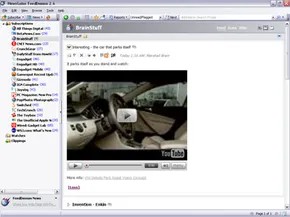
You need an RSS aggregator to break out of this cycle. You need a tool that can collect data from dozens of sources into a single stream. Requires a computer. Internet connection required. You need software that understands RSS files.
Once you have those, you control the chaos. Do you need the whole article or just the title? Want everything sorted and shuffled by date? Or do you want to separate CNN from HowStuffWorks? Your aggregator decides.
Browser traps
Next, look at the screen. See the orange square with the radio waves? This is the RSS symbol. Most modern browsers display this message when you visit blogs and news sites. You may see a list of feed links. Click on one. Subscribe.
Some browsers handle this natively. Firefox. Internet Explorer. Safari. They let you read feeds inside the browser window.
This feels convenient. Never switch apps. Stick to your workflow. If you come across a great website while reading, you can immediately follow it. There is no context switching.
However, it has a fatal flaw. Synchronization.
If you use multiple computers, the browser method will fail. Read the headlines for 15 minutes at your desk. you go home You open the laptop. The same title is displayed again. You have wasted fifteen minutes. The browser does not communicate with other devices. The information is stored in local cookies and history.
When using a web-based approach
A personal landing page is better than nothing, but it has its limitations. They show a few items per feed. They group feeds by site. They are static.
If you want a mixed feed, if you want the newest item from any source, you need a separate web aggregator. You can solve synchronization problems with sites like Bloglines, Google Reader and Rojo. They live in the cloud. Data follows you.
These services offer more than just a stream. They provide organization.
“If you want to put national news in one folder and garden blogs in another, you can.”
You can create custom folders. You can hide noise. You can filter the signal.
The choice is yours. If you stay in the browser, your progress will be lost between devices. Or go to a web aggregator to take control. The technology is simple. The habit is the hard part.
Input reader and browser basics
Override your browser’s default settings for control. Use special feed reader software. It offers features that cannot be achieved by normal browsing. Save items for later. Read offline. Sync between your laptop and phone. It’s not always free, and it’s less convenient than clicking a tab. However, if you use a lot of RSS traffic, the trade-off is worth it.
RSS is not magic. It’s just text files on web servers. Same as a regular website. The difference is in the structure. RSS uses the W3C’s Resource Description Framework (RDF) to control aggregators. RDF is built on top of XML. XML is similar to HTML. HTML makes everyday browsing more efficient.
Writing these tags is different from coding them from scratch. You wrap existing text. Consider bold text in HTML. Place and before and after the sentence.
HTML is really great.
Browsers read these tags according to industry standards. RSS follows the same rules. Aggregators and browsers interpret the feed so they can scan it quickly.
XML adds an invisible layer. It tells the aggregator where to find the standard. This happens in the background. You will never see it. But labels are important. They tell your reader how to display the feed. Font size? Author name? Publication date? Last updated? Everything is there. This metadata helps you choose what you read.
Unlock without code
Want to add a new RSS feed to your blog? Most modern tools handle this. Blogger. Vox. Movable Type. WordPress. They will automatically syndicate your blog. No need to learn code. The software creates addresses, titles and content description fields.
Proprietary systems are different. News organizations and custom websites must include RSS in their code. This requires programming skills. If you know C# or a similar language, you can writing your own feed logic.
In addition to text inputs
RSS carries more than words. Depending on the feed type, you get images. Audio. Video.
Subscribing to a podcast in iTunes is using a feed. The environment is just different. Some web-based email readers also allow you to subscribe to email feeds. It’s not just news anymore.
The current state of syndication
RSS has changed the way people access information online. It started as a standardized distribution method. Early portals became staples for news aggregators. Bloggers used them. Publishers relied on them.
The rise of social media. Personalized streams emerged. RSS faces tough competition. It still holds ground. Users who prefer the decentralized approach will continue to use it. No algorithms filtering their feed.
Podcasts still run on RSS. People use this to keep up with their favorite sites without the distraction of social media. The technology is developing slowly but steadily. This legacy reminds us why user choice matters. And why an open internet persists?
Frequently asked questions
What does RSS mean?
Real Simple Syndication. This is a web feed format. This allows users to access website updates in a computer-readable format.
Is RSS still used?
Yes. Many people still use it. When it comes to casual browsing, Social media eclipsed it for casual browsing. However, dedicated users prefer its unfiltered nature.
What is RSS and how can I use it?
Share news and news-like content. Used by major websites like Wired. Personal blogs use it. You subscribe via an aggregator. The feed summarizes content. You don’t need to visit each site individually to get the latest information.