


Dropbox is more than a hard drive in the sky. It’s one of the original pillars of cloud storage and file sharing, but calling it a “backup tool” doesn’t do it justice. Over the years, the platform has developed into the central hub of your digital life. It can handle everything from simple cross-device file synchronization to complex team collaboration. Whether you’re a student, teacher, or small business owner, this app offers a way to keep your data organized, secure, and accessible without an IT degree.
Basically, Dropbox solves your “version control” problem. Save the document to the Dropbox folder on your laptop. The files appear immediately on your tablet, phone or desktop. This real-time sync is where the magic happens. Available for Windows, macOS, Linux, Android and iOS. Continuity is seamless. When you change devices, your context switches with you.
How Dropbox syncs and shares files
The reliability of the sync engine is why people stick with it. But this is more than just a copy. Dropbox tracks file history. If you accidentally delete an item or replace a spreadsheet with junk data, you can revert to a previous version. It’s a savior from small digital disasters.
It also handles sharing with surgical precision. You don’t have to give anyone access to your life’s work. You can share specific files or folders. Dropbox creates a secure link for this. You can control who sees what. This selective sharing is important to protect your privacy while remaining productive.
Integration gives you flexibility. It’s not just Dropbox. Works well with Microsoft Office, Google Workspace, Slack and Zoom. These integrations reduce friction when working with distributed teams. You can annotate documents directly in your browser. You can manage access rights for specific users. Notifications can help you stay up to date without constantly checking your email.
Security and modern productivity
Security is not an afterthought here. Files are encrypted both during transfer and at rest. It complies with many industry regulatory standards. It also addresses growing concerns about data privacy. Users know that their documents are protected from prying eyes during transmission and storage.
This focus on security and ease of use strengthens Dropbox’s role in modern digital productivity. It’s not just about storage anymore. It’s about workflow. This reduces the administrative burden of manual file management.
Install Dropbox on any device
Getting started is very easy. This process is designed for non-technical users. The software can be uploaded from official websites or trusted software repositories. No complicated coding or command line configuration required. Just run the installer and follow the instructions to sign in.
The compatibility list is extensive. Windows and macOS users get a dedicated folder in File Explorer. It feels native. Linux users have dedicated clients for most major distributions. It brings the same smooth experience to open source environments.
Mobile users are not ignored either. View, edit, upload and share files on the go with apps from Google Play and the App Store. If you refuse to install the application, the web interface works in all browsers. This is universal.
Configuration and version control
Once installed, you can control it. You can select the folders to be synchronized. You can choose where it is saved on your hard drive. If you don’t have enough space, you can enable selective sync. This allows you to keep your files in the cloud instead of on your local disk until you need them. Save bandwidth and disk space.
What if I need an older version? New software updates may have compatibility issues. Or you may need a legacy client for certain workflows. Older versions are archived in the Dropbox Help Center. You can upload it directly.
Updates usually happen automatically. However, you can force the update through the settings if you want. You can also upload it manually if you want to stay on the bleeding edge or an older stable version.
The ecosystem is very strong. It takes care of the tedious work of file management, so you don’t have to. However, it is not without its quirks. Synchronization conflicts still occur. Large files can take time with large files. The user interface is clean, but the settings menu feels buried.
But for most people, the trade-off is worth it. Access your files from anywhere. You get protection against hardware failures. Collaborate more easily. The question is not whether Dropbox works. It’s about whether you can afford not to use it.
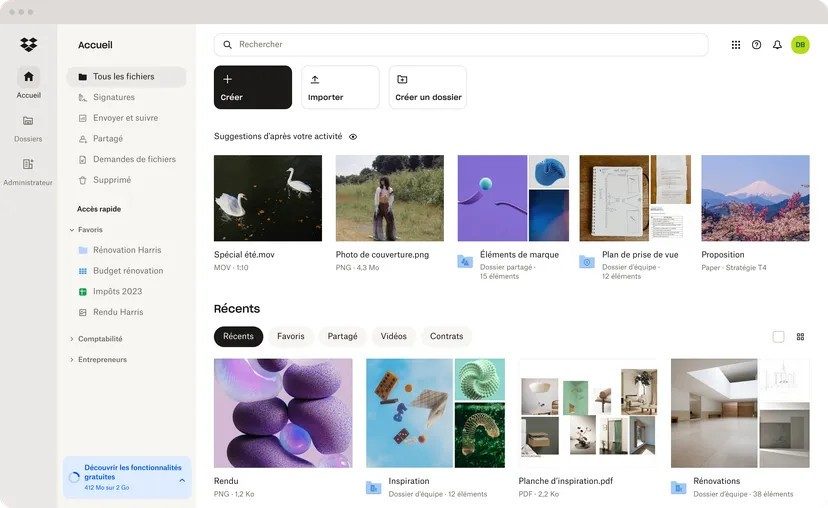

Pricing Tiers and the Dropbox Ecosystem
Dropbox doesn’t enforce a one-size-fits-all approach. In fact, the pricing structure is designed for everyone from hobbyists to large businesses, so you can try it without any financial risk.
Get started with Dropbox Basic. It’s free. You get 2 GB of storage space. that’s it. For most people, 2GB is enough to store several months of smartphone photos. However, it can be useful if you want to sync important documents or keep sensitive files off your local hard drive. This is a sandbox. Learn the user interface. See how offline viewing works. Test automatic photo backup. If it clicks, you stay. If not, delete it.
Need more space? Paid tiers are now available.
The Dropbox Plus and Family packages offer up to 2 TB (or more depending on current offers). It’s not just a matter of space. It’s all about functionality. The version history you get actually goes back even further. You can use password protection for shared links. This is a small thing that is important when sending sensitive contracts. You get better offline sync capabilities.
For teams, the logic shifts. Dropbox Business and Enterprise are more than just big buckets. They are control panels. Administrators have a centralized dashboard. You can control who has access to what. They can conduct an audit. Security policies can be fully enforced. It’s built with scaling in mind, not just storage.
Are you a student or an educator? Dropbox may offer special offers or free trials to attract users. This is a strategic move. When universities adopt Dropbox as an educational resource, students carry this habit with them in the workplace.
How does it compare to Google Drive and Microsoft OneDrive?
Dropbox wins for reliable syncing. It is sturdy. The user interface is very simple. Even non-technical users can understand it in minutes. Of course, the free tier is more meager than Google’s 15GB. But the paid experience is Dropbox’s strength. We focus on data recovery, version control and a tight software ecosystem.
The ecosystem is expanding. Dropbox Paper is a clean, clutter-free and collaborative note-taking tool. HelloSign (acquired by Dropbox) handles electronic signatures. It’s not just about saving files. You control your workflow. Dropbox has become a central hub for document management, especially for remote work.
Support, compatibility and advanced integration
No matter how good the software is, it’s useless if you get stuck. Dropbox knows this. Their help center is very comprehensive. A step-by-step installation guide for any operating system. Migration tips. Instructions for recovering accidentally deleted files. This is a lifeline, especially for IT administrators and power users with complex workflows.
Compatibility is not negotiable. Dropbox works on Windows, macOS, Linux, iOS, and Android. These applications are regularly updated to fix security holes and improve efficiency. Mobile apps do more than just display files. You can scan documents directly with the phone’s camera. Everything can be accessed offline.
It offers even more flexibility for power users and IT departments. Fine-grained endpoint management is possible. SSO (Single Sign-on) integration. Compatible with Identity and Access Management (IAM) tools. Automate document workflows through APIs. This is more than just a cabinet. It is an infrastructure component.
What is the learning curve? Dropbox offers webinars and online resources to help you master the tool. Approved training providers also offer employer-approved courses. If you really want to use Dropbox in a professional environment, there are ways to get certified.
Downloading from the official website ensures that you get the latest and safe version. No sketchy third-party mirrors. This is the cloud storage standard. Whether you’re backing up family photos, managing school projects, or managing a global team, Dropbox is committed to providing a consistent user experience across all devices.
You can count on it. It’s safe. For now, this is the default choice for many people who want their files to work without thinking.
Before you download it, let’s talk about the technical details.
Dropbox is more than just a folder on your desktop. This is a synchronization program that works with the web interface of modern browsers. If you’re going to use it for backup, team collaboration, or secure sharing, you need to understand what’s going on behind the scenes. The following information is stable. Next week will be no different. This allows you to easily install and select the appropriate layer based on your actual needs.
System requirements and architecture
Dropbox supports common scenarios.
Windows. macOS. Linux. Android. iOS/iPadOS. And the internet.
The desktop has x86-64 architecture. Mobile devices have ARM. The service supports multiple languages, including French, English and other languages. Native apps can be installed on your desktop or available in mobile stores. Or skip the installation entirely and use a browser.
Synchronization requires an Internet connection. However, when configured this way, offline access works for selected elements.
Security and integration
Your data moves securely. TLS in transit. AES-256-bit encryption at rest. Two-factor authentication is common. You can lock access by using specific permissions.
It works well with the tools you already use. Microsoft 365. Google Workspace. Slack. Zoom. If you want to build something custom, there are APIs and SDKs available.
The storage space varies depending on the plan. The free level has limitations. Paid plans are expanding. Browser compatibility covers the latest versions of Chrome, Firefox, Safari and Edge. Support ranges from an online help center to step-by-step help depending on your order.
Hardware requirements are minimal. Works on a standard PC or mobile device. You don’t need fancy specs.
Why Dropbox still matters
Dropbox remains a reliable workhorse for cloud storage and syncing.
This is a great option if you want to work smoothly across multiple devices. Installation is quick. The user interface is consistent. Track changes synchronously to avoid drama. Sharing links, managing access rights and handling notifications are perfect for the daily tasks of teams and freelancers. The learning curve is low. New users are not lost.
The real benefit is in the action. Version history. file recovery. Precise access control. Security is achieved with encryption and two-step authentication. Add another layer of link protection. An integrated ecosystem streamlines your workflow. With mobile devices, document scanning and offline access help you stay productive even when the network is unstable.
Disadvantages
Not everything is perfect.
The free space is tight. If you use it regularly, you’ll hit a wall and consider buying a subscription. Initial indexing can be resource intensive in some configurations, especially when restoring large volumes. Recent changes to the macOS architecture as per Apple guidelines have changed the behavior of folder paths and on-demand file behaviors. Adaptation takes time. Organizations concerned about the location of their data should check their sector-specific compliance rules.
Verdict
Dropbox balances reliable synchronization, excellent ergonomics, and an ecosystem of collaboration.
Mobile professionals, small teams and content creators will find a solid foundation for centralized documentation. If you’re looking for lots of free storage, look elsewhere. If reliability and cross-platform compatibility are a priority, getting the official version from Futura ensures a quick and clean installation.
246,000


