


Most people think of waiting for files to download as boiling water. Start it and then do something else and hope it doesn’t crash when it’s done. This idea is outdated. Free Download Manager (FDM) exists to break this cycle and turn passive waiting into a proactive and optimized process. It’s an open source, completely free tool that has become the standard for people fed up with slow transfers and messy file structure.
The magic happens in the background. FDM uses advanced algorithms to split large files into smaller parts. Then it downloads these chunks simultaneously. This multi-threaded approach reduces processing time, even for large files hosted on slow remote servers. Whether you’re downloading high-resolution videos, music libraries or important data, the software adapts to the load. It doesn’t matter if the source is a simple HTTP link or a complex torrent. That’s all it takes to get the job done faster.
Why multipart downloads are important for speed
Standard download managers usually fetch only one data stream. FDM changes the physics of transmission. By splitting the file, it maximizes bandwidth usage. If your connection is stable but the server is slow, this method will allow you to get the maximum speed possible out of your link.
But speed is only half the story. Reliability is another matter. Network connections are fragile. A weak Wi-Fi signal or a brief outage from your Internet service provider can disrupt your downloads for up to an hour. FDM handles interrupts gracefully. It supports resuming paused transfers. If your connection drops, you do not start over. You can continue where you left off. This feature alone makes it essential for users in areas with unstable internet infrastructure.
Controls bandwidth and browser integration
You might think that maximizing download speed is always the goal. it is not. Sometimes you need to watch Netflix while downloading a game or using a shared office network, and it’s rude to waste bandwidth. FDM gives you fine-grained control over the bandwidth used. You can limit speeds to maintain performance for other tasks on your home or business network.
This software works well with the tools you already use. It integrates directly with major browsers, such as Google Chrome and Mozilla Firefox, with the help of special extensions. You don’t need to copy and paste URLs or switch windows. You can send download links to FDM directly from your browser. This seamless connection simplifies the workflow for beginners looking for ease of use and advanced users looking for efficiency.
Unity of different platforms and easy installation
One of the strongest arguments against FDM is its universality. Not locked into the ecosystem. The software works on Windows (32-bit and 64-bit, Windows 7 – Windows 11), macOS, Linux and Android. This scope means you can use the same logic to manage files on your desktop, laptop and mobile.
Installation is easy for all platforms. In Windows, you can obtain the executable file from a trusted source and follow the prompts. macOS and Linux users receive packages adapted to their system architecture. Available for Android users from the Play Store, it brings advanced control to your smartphone or tablet. The user interface remains consistent everywhere. Learn it on one device and know how to use it on another.
Design and Preview modern workflows
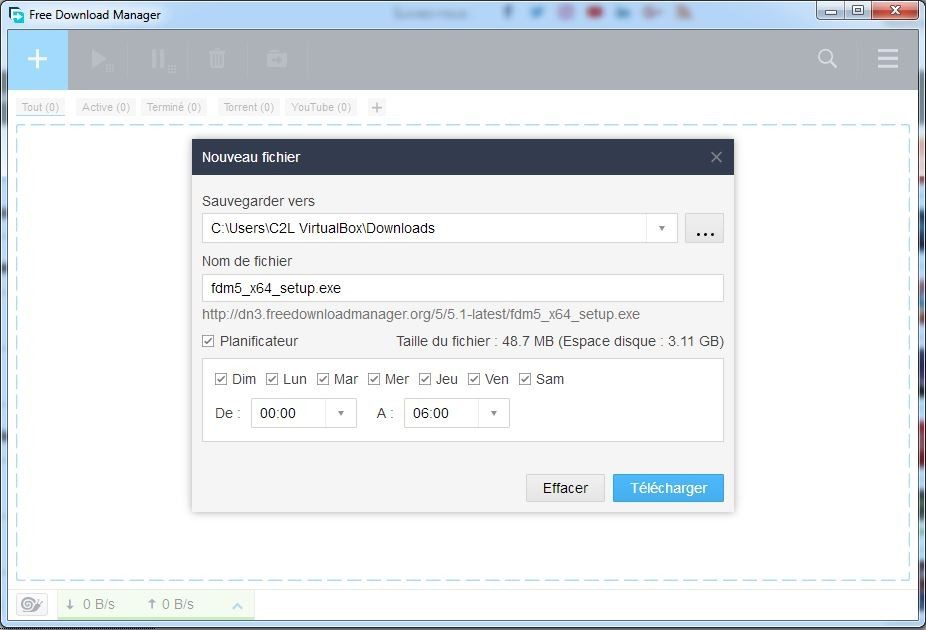
Modern file management is not just about storage. Timing and visibility are important. FDM allows you to group downloads into groups. You can schedule transfers to run during off-peak hours to enjoy free internet access during the day. Perhaps the most useful feature for media consumers is the preview feature. You can watch videos and listen to music while downloading. This is a complete game changer for large media files that take hours to retrieve.
Updates are made regularly, including security fixes and performance improvements. But what if you’re stuck with the old system? FDM doesn’t force you into the future. Older versions are available for download. This is important for compatibility with old software and old operating systems that refuse to update. Ensure continuity without forcing conversions that can disrupt workflow.
The file transfer landscape is moving towards automation and speed. Tools like FDM are not only useful; These are essential for a productive digital life. However, there is much to explore beyond the basic downloads. The next layer includes how these tools interact with the broader cyber ecosystem and their often overlooked security implications.

Efficient management of downloads does not require a paid license. Free Download Manager (FDM) proves this with every line of code it provides. Remove the payment barriers that plague our competitors. Get the full feature set now. No trials. There is no student discount. It’s a really powerful tool.
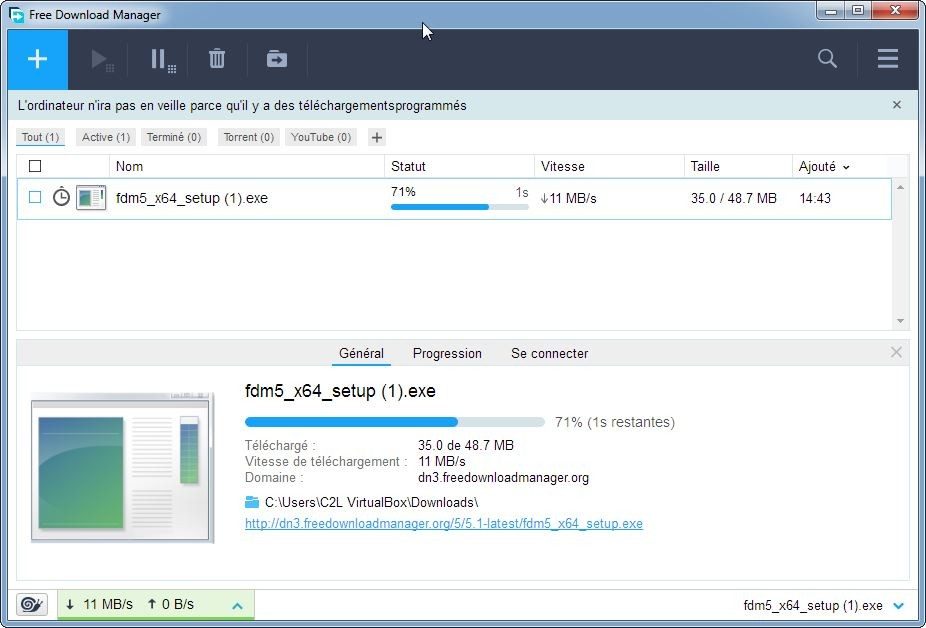
This is more than just a download accelerator. This is a central hub for incorporating digital information. Whether you want to copy large video files or small archives, FDM can handle the heavy lifting. Split the file into parts. The segments are loaded simultaneously. This will increase your speed. Uses available bandwidth more efficiently than standard browser downloads.
How Free Download Manager organizes your chaos
仪表板很干净。 这很直观。 添加文件轻而易举。 您可以直接粘贴链接。 或者让浏览器扩展自动捕获它们。 该软件将从那里接管。 它按类型对传入文件进行分类。 Audio. 视频。 文件。 档案。 所有内容都位于正确的文件夹中。 您不再需要在凌乱的桌面上进行挖掘。
调度是另一层控制。 您可以设置开始或暂停传输的特定时间。 如果您使用按流量计费的连接,这一点很重要。 或者如果您白天工作需要带宽。 把繁重的工作留给下班时间。 您的网络在您最需要的时候保持响应。
Security and privacy of free tools
No registration required. Install it. Run it. No data collection is required. This is reassuring for users who value their privacy. No ID is required to use this tool. Advanced users can adjust proxy settings. You can set usage restrictions. They can enforce strict privacy rules. Sensitive control without complexity.
Integrated antivirus checks files as they arrive. Automatic scans reduce the risk of malware. There is no need to check each download manually. The software performs an initial pass. This is a safety net for the sloppy or busy.
Built-in BitTorrent support. You don’t need separate torrent clients cluttering up your system. One application can handle HTTP, HTTPS and torrent protocols. It focuses on the experience. There will be fewer windows. There will be fewer collisions.
Why FDM Beats Paid Competitors
Compare FDM and Internet Download Manager (IDM). IDM is powerful. But it costs money. For some features, this is a recurring fee. EagleGet? Dead. JDownloader? Powerful but bloated. FDM sits in the sweet spot.
The feature-cost ratio is unmatched. You can achieve faster download speed. Managing large files. Scheduling. Multi-browser support. Bandwidth management. BitTorrent integration. All included. No upselling. There is no “premium” tier that prevents basic functionality. This openness reflects a community-oriented approach. Developers prioritize practicality over profit.
Support and long life
Documentation lives on the official site. The forum is very active. Users helping users. The tutorials are extensive. The software is updated regularly. These updates address security patches. These ensure compatibility with new operating system versions. Browser extensions react to changes. If you get stuck, help is nearby. Video guides walk you through advanced settings. Step-by-step articles cover edge cases.
This project feels sustainable. It’s not a flash-in-the-pan tool. It evolves with digital trends. You can use it occasionally for big files. Or continuously for daily data streams. It remains stable. It performs. And it’s still free.
That’s the real win. In a landscape of subscription traps and feature gating, FDM offers something unusual. Complete access. No strings attached. The digital information economy is becoming more and more difficult. Download managers shouldn’t be a burden on your wallet.
Is it perfect? Maybe not. But it’s close. In software, “close” usually means “good enough to be the best.” You can keep your files organized. Increase download speed. Your privacy remains intact. The rest is just noise.

The Tech Specs Behind Free Download Manager
Free Download Manager (FDM) isn’t just another utility cluttering your system tray. It’s built on a foundation designed to handle the messy reality of web file retrieval. If you are looking for a reliable free download manager that balances power with simplicity, the technical backbone matters. FDM handles this by supporting a wide array of operating systems and protocols, ensuring it doesn’t just work on your main desktop but also on your phone or Linux machine.
The software is distributed as free and open-source software. This isn’t just marketing fluff; it means the core code is accessible, which often translates to faster security patches and community-driven improvements. You don’t need to pay to get the full feature set. The developer behind it operates under the name FreeDownloadManager.org, and the tool sits squarely in the Internet > Download Manager category.
Compatibility and System Requirements
One of the strongest selling points is its cross-platform flexibility. You aren’t locked into one ecosystem.
- Windows : It covers the full spectrum from Windows 7 up to Windows 11. Both 32-bit and 64-bit architectures are supported.
- macOS & Linux : Native clients exist for these environments.
- Android : The mobile experience is handled via an ARM-based app available through the standard app store.
This breadth means you can centralize your download management across devices. Whether you start a large file transfer on your PC at work and want to monitor it on your phone later, or you are running a headless Linux server, the tool adapts.
The interface itself is multilingual. While many tools assume English-first, FDM supports French and other languages, making it accessible without a steep learning curve for non-English speakers.
Protocols and Link Handling
How does it actually grab files? FDM is not limited to simple HTTP clicks. It understands the modern web’s fragmented nature.
- HTTP & HTTPS : Standard web downloads. The HTTPS support is crucial for security, ensuring data integrity during transit.
- FTP : For those legacy file transfers or private servers that still rely on this protocol.
- BitTorrent : It handles
.torrentfiles and magnet links seamlessly. This is key for anyone downloading large media libraries or open-source software distributions.
The software automatically captures links detected in your browser—primarily Google Chrome and Mozilla Firefox. This integration removes the friction of manually copying URLs. You see a download? FDM grabs it. You can also add URLs manually, which is useful for batch operations or private links.
Core Features That Matter
Beyond basic downloading, FDM offers controls that power users expect.
Segmented Download Acceleration
This is the engine that makes FDM fast. Instead of pulling a file in one stream, it breaks the file into segments. It downloads these pieces simultaneously. If one connection stalls, the others keep moving. This is especially effective on high-latency connections or when downloading from servers that throttle single connections.
Bandwidth Control
You can cap how much bandwidth the manager uses. This prevents your download from hogging your entire internet connection, leaving enough room for browsing, video calls, or gaming.
Scheduling
Need to download a massive ISO file at 3 AM? You can set the schedule. The software wakes up, downloads your data, and sleeps until the next task.
Media Previews
It doesn’t just save files; it can preview them. Audio and video files can be played directly within the app before you even finish downloading. This saves time—you can verify the file is correct before committing the storage space.
Categorization
Downloads are sorted. You can tag and filter them by type or status. This keeps the UI clean when you have dozens of active transfers running.
Security and Privacy
Does it spy on you? FDM can run without requiring an account. You don

它从代码开始。 不是经过精心设计、适合营销的版本,而是实际运行的原始、未经优化的混乱版本。 您看到一个现代的应用程序,会看到时尚的界面、快速的响应和漂亮的动画。 然后你再深入挖掘。 您会看到依赖关系。 有数百个。 有些是必不可少的。 大多数都是矫枉过正。 The就是现代软件开发的现实。 The不仅仅是编写逻辑。 The是关于管理混乱。
Dependency Trap
Every time a developer adds a new library, they make a bet. This tool solves one problem for you instead of creating five new ones. In many cases this is not the case. Today the code base is smaller, but tomorrow it will be a security nightmare. The problem is not just installing the package. As such, we still rely on third-party code to handle basic tasks.
Let’s consider authentication. There is no need to build the user’s login system from scratch. That is true. But do you really need a 500MB npm package to handle it? Or is it easier to write a safe and simple handler that meets your specific needs? The industry is no longer simple. We like abstraction. We prioritize comfort. Until the convenience breaks. And it always breaks.
性能与功能
用户不关心你的功能列表。 他们关心页面是否加载。 如果超过三秒钟,他们就会离开。 就The么简单。 但产品经理想要一切花哨的东西。 聊天小部件。 跟踪脚本。 社交媒体提要。 每一个都会增加重量。 每一个都会减慢关键渲染路径的速度。
The种权衡对于最终用户来说是不可见的,直到它变得可见。 一个缓慢的应用程序感觉很糟糕。 损坏的应用程序感觉不安全。 The就是天平倾斜的地方。 开发人员的任务是添加更多功能,同时保持较小的包大小。 The是一场不可能的游戏。 但总得有人来玩。
Security costs
Open source is a double-edged sword. This allows us to stand on the shoulders of giants. However, these giants often fall asleep at the wheel. Common library vulnerabilities don’t just affect libraries. They affect everyone who uses them. The Log4j incident was a wake-up call. But the wake-up didn’t last long. We are back to ignoring version updates. Back to trusting code we didn’t write.
Why do we ignore updates? Fear of breaking things. Lack of time. Inadequate testing infrastructure. This is a cycle. An expensive cycle. Any unpatched dependencies are potential entry points for attackers. The price of vulnerabilities far exceeds the cost of a proper security audit. However, auditing is expensive. Breaches are catastrophic. The math is clear. The practice is not.
接下来会发生什么?
该行业正在发生转变。 慢慢地。 人们正在推动更小、更专业的工具。 A move away from monolithic frameworks. 但改变是困难的。 遗留代码无处不在。 重构是有风险的。 所以我们不断地打补丁。 我们不断添加层。 直到结构倒塌。
或者也许不会。 也许我们会学会建造更好的东西。 与功能一样重视性能。 将安全视为核心组成部分,而不是事后的想法。 工具就在那里。 知识是存在的。 问题是我们是否会使用它们。 或者继续挖同一个洞,一次一个依赖项。
The


