





We are glued to our screens. A phone, a laptop, or a tablet gives us instant access to virtually any data point we crave. It is convenient. It is constant. But convenience cuts both ways. Sometimes information doesn’t wait for you to search for it. Sometimes it needs to come straight to you. And when that message needs to hit thousands of people simultaneously, dialing a number or hitting “send” on an email simply doesn’t cut it.
This is where broadcast messaging enters the picture. It is not just about sending a note. It is a collection of techniques designed to deliver information to a massive audience in one go.
Why Speed and Reach Matter
Think about the stakes. During a weather emergency, law enforcement needs to warn the public of life-threatening conditions immediately. There is no time for individual calls. A doctor’s office might use these systems to notify hundreds of patients that flu shots have arrived. An electronics retailer might alert subscribers that a highly anticipated video game is finally available for pre-order.
The goal is simple: reach as many people as possible, as quickly as possible.
To achieve this, the technology has to be versatile. Messages can be recorded voice calls, standard emails, text messages, or even faxes. They travel over traditional phone lines, cellular networks, or the open internet. But behind the scenes, it requires a heavy lift. You need a robust database of contact information and hardware capable of handling massive data spikes without choking.
The core challenge of broadcast messaging is not just delivery, but verification. Senders often need to know if their messages actually arrived and if the recipients understood them.
The Mechanics of Two-Way Communication
Not all broadcasts are one-way streets. Consider a dentist’s office. They send out appointment reminders via automated phone messages. The patient needs to respond. They press one button to confirm the slot and another to cancel.
For urgent alerts, this feedback loop is critical. The sender needs to know if the message got through. Did the recipient see the emergency warning? Did they hear the flu shot announcement? This complexity is why most organizations do not build these systems in-house. They start with a service provider.
Providers have the staff and the specialized equipment to handle the details. The sender—whether an individual or a corporation—works with the provider to ensure efficiency.
What Providers Actually Offer
Providers are not monolithic. Their tools vary wildly depending on the scale of the operation. Generally, however, you can expect a specific stack of infrastructure:
- A server to store and access massive contact databases. Some providers even install this server behind a client’s firewall for added security.
- Hardware and software that holds messages and routes them to the correct recipients.
- Storage space for archiving both the sent messages and the incoming replies.
- Analytics software to track and record responses.
- Encryption tools for handling sensitive data.
Service plans differ just as much as cell phone contracts. You might pay for minutes used, messages sent per billing period, or the sheer number of contacts in your database. The cost also fluctuates based on the type of message, the size of email attachments, and how much archive space you require.
Compliance and Data Hygiene
Once a sender picks a provider and a plan, the real work begins. You have to upload your contacts to the provider’s database. Some services allow you to pull existing lists, like Gmail or Outlook address books. Other times, you are stuck doing manual data entry to build the list from scratch.
If you are a business trying to sell products, there is a legal hurdle you cannot ignore. You must ensure your list does not conflict with national or local do-not-call lists. Violating these regulations is a fast track to fines and reputation damage.
People move. They change numbers. They change emails. Not everyone wants to be pestered by alerts. Good providers account for this. They allow recipients to update their info or opt out directly from the message itself. Senders can create filters to segment their audience, ensuring that only interested parties receive specific broadcasts.
We have covered the infrastructure. The setup. The compliance. Next, we will look at exactly what happens when a sender actually creates the message.
Sending Broadcast Messages

You type a message into a web portal. The provider’s server holds it hostage until the scheduled time. Then, machines take over. They handle the dialing, addressing, and delivery. It feels like magic, but it’s just logistics at scale.
Most platforms let you choose the delivery method. Phone? Text? Email? Fax? Or you let the system decide based on recipient preferences. The real power lies in escalation. If the phone call goes to voicemail or bounces, the service doesn’t stop. It tries a text. If that fails, it might try email. It keeps pushing until it hits a recipient or exhausts every option.
Here is the technical breakdown of what happens behind the scenes.
The Voice Message Pipeline
Senders have two choices for voice broadcasts. You can record your own voice. Or, you can type the script and let text-to-speech software do the heavy lifting.
Text-to-speech engines don’t just read words. They deconstruct them. The software uses complex algorithms to break typed words into phonemes. These are the smallest sound units of language. The computerized voice then reconstructs those phonemes into audible speech.
For delivery, providers rarely use the old circuit-switched telephone network anymore. They use Voice over Internet Protocol (VoIP). It is cheaper and faster.
The process looks like this:
1. The audio is digitized. The system measures sound waves at frequent intervals.
2. Those measurements become binary data (ones and zeros).
3. This data travels over the Internet as packets.
4. A gateway bridges the gap, transferring the data from the internet to the traditional phone network.
Some services also handle responses. Instead of forwarding every reply to you, they tally the data. You get a report. Recipients can press buttons on their keypads or speak their answers. If they speak, the service uses speech recognition software to process it.
The Cell Broadcast Controversy
Not all messages go to specific numbers. There is cell broadcasting, a more aggressive delivery method.
Cell phones constantly ping the nearest tower. This keeps the network aware of the device’s location. Cell broadcasting leverages this. It sends a message to everyone in a specific cell tower’s coverage area.
It is highly effective for emergencies. Think weather alerts or Amber Alerts. You get the warning instantly, regardless of who you are.
But it is not without critics. Privacy advocates warn against non-emergency commercial use. If a company can blast ads to everyone in a downtown radius, that crosses a line. The technology exists. The debate is about whether it should be used.
Text Messages
Text messaging seems simple. But at the broadcast level, it involves more than just SMS.
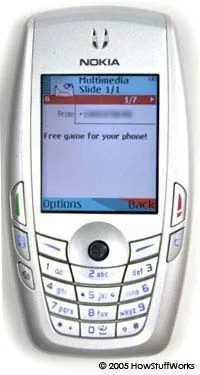
Text messages aren’t just magic. They travel through a specific chain of hardware and software. Short message service (SMS) is the protocol used when your phone talks to another phone. But broadcast messaging? That’s a different beast. It moves from a computer to many phones. The sender types a message into a web interface. Then the provider routes it through an SMS gateway. This gateway connects the internet to the cellular network.
From there, the message hits the short message service center (SMSC). The SMSC is a critical piece of infrastructure. It stores and routes these messages. The SMSC finds the cell tower closest to the recipient. The tower relays the signal to the device. You can read How SMS Works to see the full path.
The Limits of SMS Broadcasts
Text messages have strict size constraints. They are usually capped at 160 characters. Carriers often charge small fees for receiving them. This cost structure creates friction. Many broadcast services let recipients opt out. Heavy traffic also causes delays. Delivery isn’t instant. Because of this latency, people hesitate to use SMS for critical info.
Facsimile Broadcasts Over IP
Facsimile broadcasts are changing. They generally use Fax over Internet Protocol (FoIP). This is cheaper than traditional faxing. Like VoIP, FoIP breaks information into data packets. It sends them over the internet. The service can store the message. Then it forwards it as an email attachment. Or it transmits the fax in real time. Real-time FoIP looks like a traditional fax. But the data travels over the internet, not the phone line. How FoIP Works explains the packet journey.
E-mail Mass Mailing
Sending a broadcast via e-mail is like emailing a long friend list. But on a massive scale. Providers use high-capacity email servers. They pair them with high-bandwidth internet connections. This prevents network congestion. Providers work with ISPs to avoid spam filters. Legitimate services follow strict guidelines. They must adhere to rules for unsolicited messages.
The Privacy and Ethics Debate
Broadcast messaging is useful. It delivers important info. In emergencies, it saves lives. But it’s controversial. Critics argue that mass collections of contacts violate privacy. Others object to message content. Political “robo-calls” faced ethical questions in 2006. Many people dislike any unsolicited message. Even with opt-out options, the objection remains. Despite this, mass communication methods are prevalent. Future use of broadcast messaging will likely increase.
Related Resources
How Stuff Works Articles
- How FoIP Works
- How VoIP Works
- How SMS Works
- How Internet Infrastructure Works
- How Teleconferencing Works
- How PCs Work
- How Web Servers Work
Additional Links
- Lanier: Understanding IP – PDF
- Cellular Telephone Basics
- Wireless Telecommunications Glossary
- FCC: Glossary of Telecommunications Terms
Sources
- Civil Emergency Alert Services Association. “What is Cell Broadcast?”
- Codespear. Broadcast Alerting.
- Codespear. SmartMsg White Paper
- Jania, Frank. “Broadcast Messaging: Messaging to the Masses.” ACM Queue. November 2003.
- Weisz, Justin D. et. Al. “Synchronous Broadcast Messaging: The Use of ICT.” CHI 2006 Proceedings. April 2006.