



Buying laptops for your employees is easy. The real problem is managing the software licenses that come with it. Each new rental requires a new purchase. Each time a sale occurs, a new refund or redistribution is made. This is a logistical nightmare for executives who can’t sleep at night staring at piles of cash disappearing into annual fees.
There is a way out.
Imagine a world where no employee has any software installed on their computer. You only need to allow access to the web-based service. They log in. Their tools appear. E-mail, word processing and complex data analysis are all performed on remote computers owned by others. This is Cloud Computing. This is more than just an IT trend. This is a seismic shift that could disrupt the traditional IT industry as we know it.
Why cloud computing is important for company IT
In traditional setups, the local computer does the heavy lifting. Process the data. Draw a graphic. Run the operating system. In a cloud computing system, that workload shifts. “The cloud” handles the processing. The hardware requirements for users have been significantly reduced.
What is the only requirement from the customer? User interface. Usually a standard web browser. that’s it. The network does the rest.
You may be using this technology without knowing it. If you use Gmail, Yahoo! Mail or Hotmail, you are already a user of the cloud service. No email client is running on your hard drive. Logging in to a remote server. Software and storage are located in the infrastructure of the service provider, not on the user’s desktop.
How cloud computing architecture works
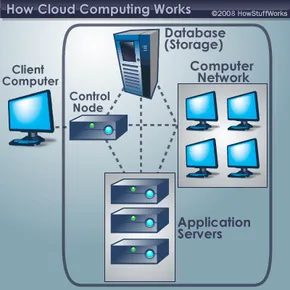
To understand how this magic happens, we need to split the system into two parts: the front end and the back end. They connect via a network, most often via the Internet.
The Front End: What You See
This is the client side. It includes the user’s computer (or network) and the applications that use the service.
* Some services, such as web-based email, make use of existing browsers such as Firefox and Chrome.
* Others require unique, dedicated client applications.
The interface is the only thing the user interacts with directly.
The Back End: The “Cloud”
Heavy machinery is installed here. It consists of servers, data storage systems and computing power to create a “cloud”.
* Dedicated server: Each application usually runs on its own server.
* Central management: The central server monitors traffic and client requests to maintain system stability.
* Middleware: This special software enables networked computers to communicate. It follows strict protocols to ensure data integrity.
Server virtualization: You get double the result with half the effort
Most physical servers do not operate at 100% capacity. They sit idle and waste energy and space. Cloud service providers solve this problem with server virtualization.
This technique tricks a single physical server into acting as multiple independent servers. Each “virtual” server uses its own operating system. By maximizing the power of a single machine, companies reduce the need for physical equipment. It’s cheaper. It’s efficient. It’s scalable.
Redundancy and storage: why data is not lost
If there are thousands of customers, storage becomes a significant bottleneck. Cloud service providers need hundreds of digital storage devices to keep up with demand. But they need twice that amount.
Why? Because hardware breaks.
Cloud computing systems rely on redundancy. Make a copy of all customer data and store it on another device. If one server fails, the central server uses a backup computer. Data is still available. Nothing has been lost.
The big picture
Although cloud computing is an emerging field, the concept has been simmering for years. It’s called “the cloud” because the data and applications exist on a distributed network of web servers.
For managers, the implications are clear. Stop buying the software. You stop managing installations. No more worries about compatibility. Buy access.
The device remains thin and light. Intelligence is still far away. Surveillance is all around you.
What happens when the company’s entire desktop disappears into the network? We have only scratched the surface.
Why move your workload to the cloud?
The usefulness of the cloud service extends far beyond file storage. With the right middleware, cloud environments can run almost any application that today’s standalone computers can handle. This includes everything from standard word processors to highly customized business software. The potential range is almost limitless.
But why entrust your data and processing to someone else’s infrastructure? The answer is operational flexibility and cost efficiency.
Customers can access applications and data from anywhere with an Internet connection. Information is no longer tied to one hard drive or locked in the company’s LAN. This mobility brings fundamental changes to the way we work.
The Economics of Thin Clients
Freeing yourself from heavy work will significantly reduce the cost of your equipment. You no longer need to buy a high-end workstation with the most RAM and processing power. The cloud can meet these needs.
Instead, organizations can adopt inexpensive computer terminals. These devices only require a display, peripherals such as a keyboard and mouse, and enough processing power to run the connection middleware. All data is stored remotely, eliminating the storage requirements of the device itself.
Software licensing just got easier for companies. Companies can pay on a pay-as-you-go basis instead of buying individual licenses for each employee. With this model, applications can be used across the enterprise without the administrative hassle of managing different software installations.
Save space and support
Physical infrastructure is also a key factor. Servers and digital storage systems take up valuable space. Many companies rent space outside just to store their databases because they don’t have space on campus. Cloud computing eliminates this need by transferring storage to someone else’s hardware.
IT support costs are also on the decline. A streamlined set of hardware reduces points of failure. Managing a network of different machines and operating systems is a maintenance nightmare. Standardizing on a single cloud service provider simplifies troubleshooting and reduces the burden on your internal IT team.
Harnessing Grid Processing Power
There are also technical benefits beyond simple convenience. When the back end of the cloud system uses grid computing, customers can take advantage of the collective processing power of the entire network.
Consider the complex calculations used in scientific research. On another computer, these tasks can take years to complete. Sending workloads to a grid-enabled cloud system pools the processing power of all available nodes. The result is a dramatic acceleration of otherwise stagnant computing tasks.
Key figures in this field
This is not a new concept born out of thin air. Big tech companies are investing heavily in defining this landscape. Microsoft, IBM and Google are investing millions of dollars in cloud infrastructure research and development.
At the same time, it is speculated that Apple will also focus on the user interface aspect. Some analysts believe the Cupertino-based company may be considering producing hardware interfaces that allow users to connect to these large cloud systems. This competition is beginning to define how we interact with this decentralized power.
While the benefits are clear, this architecture is not without its flaws. Understanding the risks is the next logical step.
People are worried about more than data loss. This means handing over the keys to your business empire to a third party. For managers, hesitation is real. You can’t lock down a cloud server in your basement. This lack of physical control creates fundamental anxiety in many boardrooms.
The industry’s counter-argument is simple. Reputation is currency. Cloud service providers live or die by their trust scores. If your data is compromised, you won’t just lose customers. they lose everyone. The implementation of the most aggressive, state-of-the-art data security protocols has a direct financial benefit. They have to.
But security is not the only obstacle. Privacy is a quieter and scarier issue.
If you can log in from a cafe in Tokyo or a server farm in Dublin, the line between “authorized access” and “invasion of privacy” becomes blurred. Services must fill this gap. how? Through authentication and authorization.
Authentication proves who you are. Usernames and passwords are the old guard. They are still relevant, but fragile. Authorization is a gatekeeper. This ensures that only the job requirements are visible, even if you are who you say you are, Nothing more. This segmentation is important to preserve privacy in a shared infrastructure.
Then there is the philosophical question. a legal gray area.
Who owns the data on these remote drives? Are you a subscriber? Or is it the service provider that owns the physical storage? Can a cloud company legally deny access to your files? These are not just technical glitches. This discussion is currently taking place between law firms and universities.
The IT economy is also changing. The technology industry is increasingly concerned about the effects of cloud adoption on traditional computer maintenance. When companies move to streamlined thin client systems, their IT footprint is reduced. The need for on-site hardware fixes drops.
Some experts don’t think IT jobs will disappear. they are migrating. The work moves to the back end of the cloud architecture. But there’s another force on the horizon: autonomic computing.
Autonomic computing systems are self-managing. They monitor their health. They detect anomalies. They attempt repairs before a human ever gets an alert. For now, this is mostly theoretical. However, if this becomes standard practice, many traditional IT maintenance roles may become redundant. The machine manages itself.
There are also hackers Beyond the corporate boardroom,
The standard technologies they use can cause huge problems for cloud service providers. key logging. The victim’s computer has a keylogger in the background. Records all keystrokes. Once a hacker gets access to your data, they can examine it and obtain usernames and passwords.
The counter here is the nature of the endpoint. If your computer is a bare device (no local storage, minimal processing power), you may not be able to install malware in the first place. The hardware itself becomes a security feature. Limit your attack surface.
The reality of cloud use and data ownership
The ownership dispute is still unresolved. Is data an asset? Or is it a service? This distinction is important when problems arise. If the service provider goes out of business, will your files go with them? If they face a subpoena, do they hand them over?
These questions are not abstract. They are driving new legislation and new contractual clauses. Companies are looking for clear terms. Users want transparency. Cloud service providers have been stuck trying to balance utility and responsibility.
How security measures adapt to remote work
As remote work becomes permanent, traditional office boundaries have disappeared. There is no more “office”. There is only the network.
This change forces us to reconsider identity verification. Passwords alone are no longer enough. Multi-factor authentication is becoming the norm. The same applies to role-based access control. There is no need to view the entire database. You just need to see your slice.
The goal is to minimize the blast radius of a breach. If user credentials are stolen, authorization rules can limit the damage. This system does not give hackers the keys to the kingdom. Only the key to the trunk.
Keystroke logs and threats to endpoint security
Keylogging is still a potential threat. It comes down to trust. Users trust the operating system. The application relies on the hardware. Hackers take advantage of this trust.
But there are protections. Reduce the likelihood of infection by reducing endpoint complexity. A thin client has less to compromise. Fewer drivers. There are fewer background processes. It is a smaller target.
This does not grant you immunity. It just makes you harder to crack.
Autonomous computing: the end of manual maintenance?
Autonomous computing promises to create systems that can repair themselves. Think of it as the immune system for enterprise software.
Detects faults. Redirect traffic. It patches vulnerabilities. It does all this without human intervention.
We’re not there yet. Not fully. But the trajectory is clear

It started as a buzzword. This is for computer scientists and engineers who like jargon. now? You cannot boot a smartphone without cloud functionality. It’s a household term.
It’s everywhere. Smartphone applications use this to store information that the handheld cannot physically hold. Research institutions use it to host large databases. Video game companies are experimenting with different ways to give you access to top-notch games without having to invest a lot of money in a gaming device.
It is difficult to determine when a particular computational model is successful. But the evidence is piling up. The cloud service has been a huge success.
How it really works
The architecture is simpler than you think. Cloud computing systems typically have a front end (what the user sees) and a back end (which does all the work). Interact with the user interface. The hard work is done elsewhere.
This is nothing new. Cloud computing has some similarities to an older computing model called time-sharing. Do you remember them? Time-sharing computer systems connect multiple users to a single computer processor via dumb terminals. There is a keyboard and a screen, but the calculations are left to the central computer.
What’s the difference now? in scale. And speed.
“Software on the Internet: Microsoft’s ‘Cloud’ Computing”.
The promise is clear. Reduce tasks such as data storage and processing power. Leave the heat to someone else’s computer.
Security issues
This is the hard part. Although cloud computing promises to lighten the burden of tasks, this model raises questions about data availability and security.
If your data is on someone else’s computer, how can you access it and keep it safe?
This is the central tension. Sacrificing control for comfort. You can entrust your photos, documents and your entire digital life to your service provider. The risks are real. Data breach. Interruption of service. Seller Lockout.
It’s not just about saving files. Your information about you is stored here. And who has the key?
The Big Players Moved In
The industry does not wait until consumers fully understand the model. they jumped in.
IBM was quick. They launched “cloud technology” in late 2007 and promoted it enthusiastically. Using data from afar. It is available to companies that want to reduce the cost of physical hardware.
Google has also joined the competition. Study cloud computing. Partner with IBM. What is their goal? advertising and data processing. The two paradigms go hand in hand. If you search, you advertise. If you are calculating, you are creating data.
Microsoft looks to the future. “The World Computer”. Nicholas Carr called it that in 2008. The idea is, “You don’t own the software.” you rent it. You let it flow.
EMC is also involved. A deal with cloud providers. Storage is fundamental. Without it, clouds are just water vapor.
Why is it important to you?
You might not think so. But your workflow depends on it.
Your photos are in iCloud. Your documents are in Google Drive. Your email is on a server that you never touch. It’s “ExaFlood”. Bret Swanson and George Gilder sound the alarm. The amount of information transferred via networks is enormous.
It changes the way we work.
You can start editing videos on your laptop. Finish it on your tablet. This is because these files are not attached to the box. They are associated with your account. This is the value proposition.
But this comes at a price. You lose your independence. You become dependent on the provider’s uptime. If the cloud goes down, you go dark.
The future is here
Nick Carr says the future of IT is not all bad news. But the situation is different. Server virtualization. Middleware. These are pipes. You can’t see it. But you can feel the speed.
The change in IT delivery is huge. It’s not coming. It’s here.
We’re moving away from owning hardware. Toward subscribing to services. Devices become a commodity. Data becomes an asset.
It’s efficient. It is scalable. It’s fragile.
Let’s see. The model has been tested. The success is undeniable. But the questions remain. Who owns your data? What happens if the cloud decides to leave?